Setup on Windows
Run Cue CLI on Windows through WSL2 and Ubuntu.
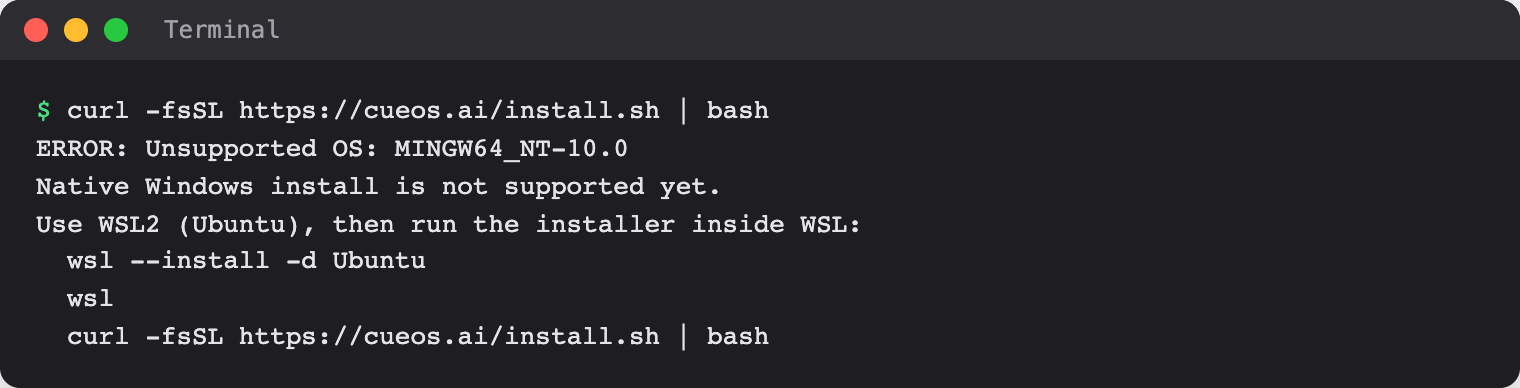
On Windows, Cue CLI for Cue OS runs inside WSL2 with Ubuntu. Native Windows install is not supported yet, so you install and run Cue in the Ubuntu terminal.
What you can do
- Install Cue CLI inside Ubuntu on WSL2.
- Use every Cue CLI command from the Ubuntu terminal.
With Cue CLI
-
In PowerShell, install WSL2 with Ubuntu if you do not have it yet, then open Ubuntu:
wsl --install -d Ubuntu wsl -
In the Ubuntu terminal, check that Node.js 22.13.0 or later is installed:
node --versionIf it is missing or older, install or upgrade Node.js using nodejs.org inside WSL. The installer checks the full version and stops before downloading Cue CLI if it is unsupported.
-
Run the installer inside Ubuntu:
curl -fsSL https://cueos.ai/install.sh | bash -
Open a new Ubuntu terminal, then check the install:
cue --version cue doctor -
Continue with
cue onboardas in Cue CLI setup.
On the web
The web does not install Cue CLI. You can use Cue OS on the web in any Windows browser.
On iPhone and Android
The iPhone and Android apps are coming; store review is pending. You can use Cue OS in your phone browser now.
Limits today
- Native Windows is not supported. Running the installer outside WSL stops with a message pointing to WSL2.
- Run
cueinside the Ubuntu terminal, not in PowerShell or Command Prompt. - The Node.js package in some Ubuntu releases is older than 22.13.0. Check
node --versionbefore you install.
Related
Cue CLI on Cue OS · Cue CLI setup · Authentication · Cue CLI command reference