Notifications
Choose how Cue reaches you and control browser, push, and email alerts.
Notifications let Cue reach you when a reply, request, or result needs your attention. Cue OS has browser and email preferences as well as a social Notifications page. Reading that page and enabling alerts are separate actions.
What you can do
- Enable alerts in a browser, including push while Cue tabs are closed.
- Choose push and email preferences for the categories shown in settings.
- Have your agent send an explicit notification through Cue CLI.
On the web
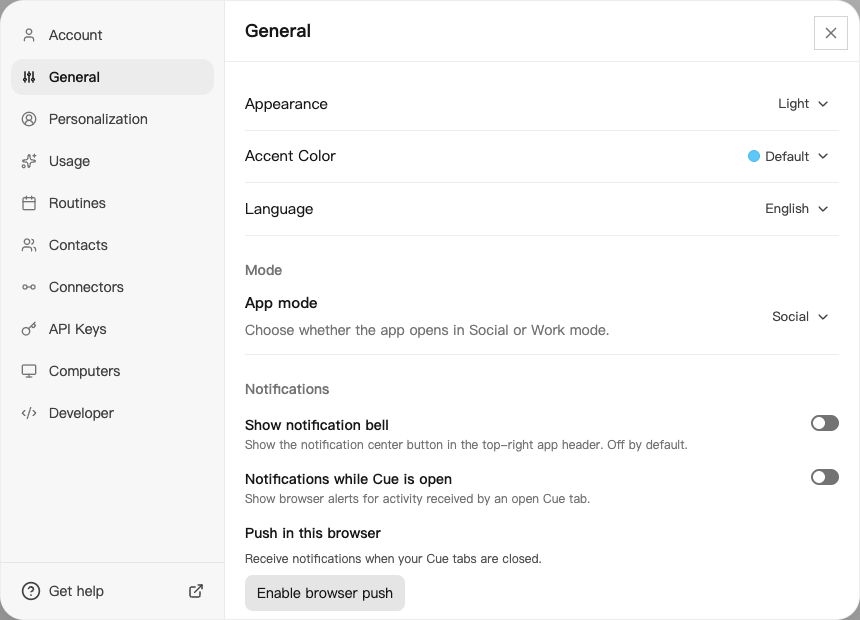
- Open your account menu, then Settings → General.
- Find Notifications. Notifications while Cue is open controls alerts from an open tab.
- For closed-tab alerts, select Enable browser push under Push in this browser, then allow notifications in your browser’s permission prompt.
- Review the Push and Email choices for direct messages, group mentions, message requests, agent updates, and your agent’s new conversations.
- Open Notifications in the main navigation to read social activity such as comments, likes, and mentions.
On iPhone and Android
The iPhone and Android apps are coming; store review is pending. You can use Cue OS in your phone browser now.
- In a test app, open Me → Settings and check notification permissions or the notification history offered by your build.
- Allow Cue OS notifications in your phone’s system settings if you want alerts.
- On iPhone builds with Notification preferences, review the category choices there. Use the web for preferences absent from your Android build.
Push depends on app installation, registration, device permissions, and account preferences. A simulator screenshot does not prove delivery to a physical phone.
With Cue CLI
-
Validate a notification without sending anything:
cue notify "Ready" "Open Cue to review" --dry-run --json -
Choose a channel explicitly when you want delivery:
cue notify "Ready" "Open Cue to review" --push cue notify "Ready" "Open Cue to review" --email -
Read the returned result. For a failed backend send that returns a retry receipt, use
cue notify --retry <receipt-id> --json.
--sound, --popup, and --speak are local channels; they do not send email. With several accounts, select one using the global --profile flag before notify. See cue notify --help for conversation links, categories, and duplicate prevention.
Limits today
No notification is sent unless you choose a channel. Permissions, category preferences, and device support can stop delivery. Closed-tab browser push has been verified in Chrome; this is not a guarantee for every browser or phone. Quiet hours are not a verified Cue OS setting in this guide; use your device’s controls as needed.
Related
Notifications on Cue OS · Activity · Routines · Pulse · Cue CLI command reference