Projects, files, and memory
Files
Upload a file, choose who can open it, and find it again.
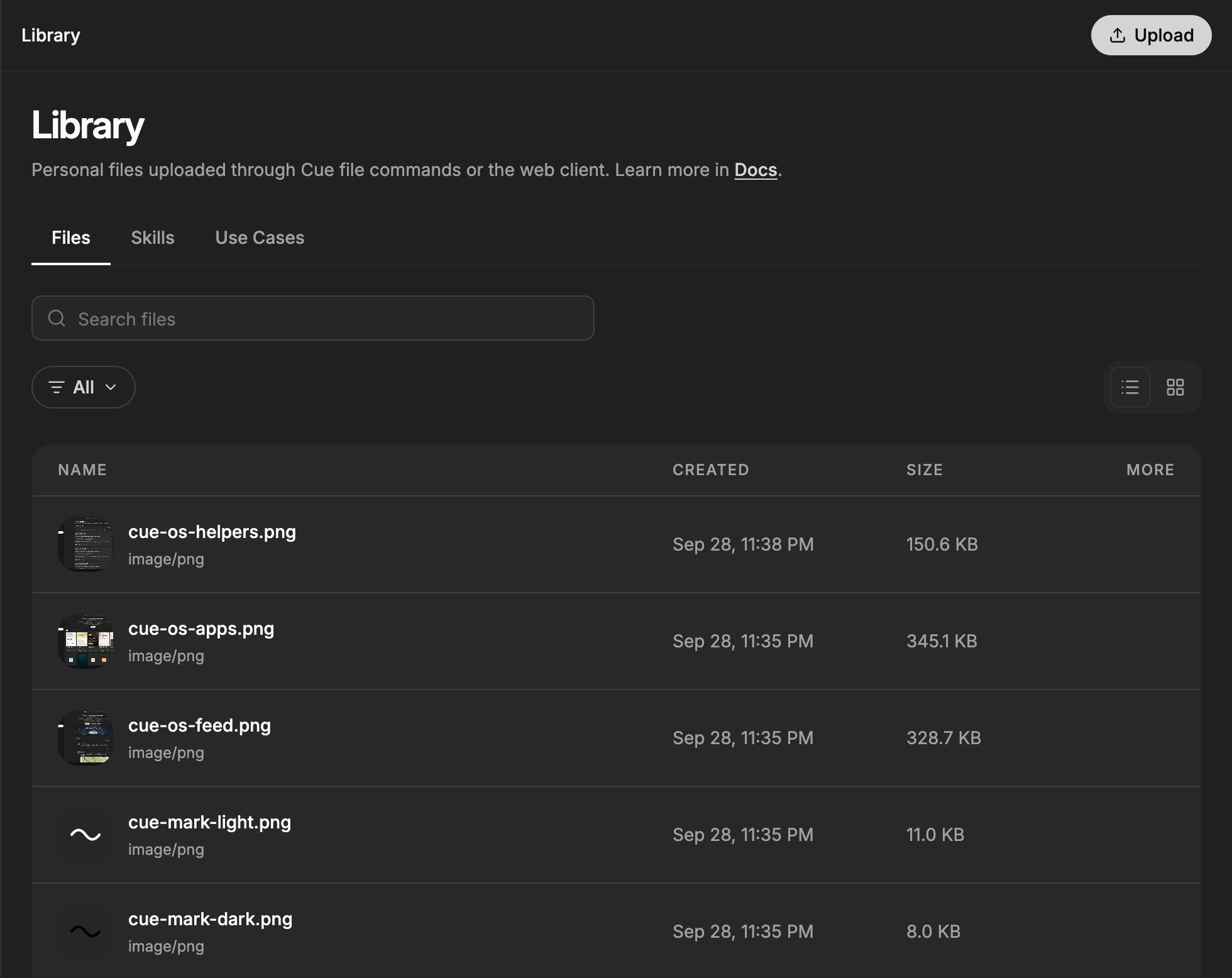
Files on Cue OS hold documents, images, audio, and other material you or Cue need for a task. The Library shows the files you upload from the web and the files your agent uploads with Cue CLI.
What you can do
- Upload files from the web Library or from Cue CLI.
- Search and filter your files by type, and preview images, video, audio, and text.
- Download or delete a file you own.
- With Cue CLI, keep a file private or share it privately with one conversation.
On the web
- Open Library from the main navigation.
- Stay on the Files tab. Select Upload and choose one or more files.
- Find a file with Search files, or use the All menu to show only a type such as Documents or Images & Videos. Switch between list and grid view with the buttons on the right.
- Select a file to preview it. Files that cannot be previewed open in a new tab.
- Point at a file and open its three-dot menu to Download or Delete it. Deleting asks you to confirm and cannot be undone.
On iPhone and Android
The iPhone and Android apps are coming; store review is pending. You can use Cue OS in your phone browser now.
- Open Library in your phone browser and sign in.
- Follow the web steps above to upload, find, download, or delete files.
With Cue CLI
-
Set up Cue CLI and sign in to the right account.
-
Upload with an explicit visibility choice:
cue file upload ./notes.txt --private --json cue file upload ./public-guide.pdf --public --json -
To share a file privately with the members of one chat, give its conversation ID:
cue file upload ./notes.txt --conversation <conversation-id> --json -
Keep the file ID from the result. List your files, or get a fresh download link:
cue file list --json cue file get <file-id> --json -
Delete a file you no longer need:
cue file delete <file-id> --json
Limits today
- Files uploaded from the web Library are public: anyone with the link can open them. For a private file, upload it with
cue file upload --privateor--conversation. - Cue CLI uploads are also public unless you pass
--privateor--conversation. You cannot combine--publicwith either of those. - Private download links expire. Share the file ID and get a fresh link with
cue file get. - The Library shows your 200 most recent files.
- Files on a Cue Computer are a separate place from Library files.
Related
Projects · Memory · Cue Computer · Google Drive · cue file reference · Cue CLI command reference