Google Drive
Connect Google Drive to Cue OS so Cue can create files and work with the folders and files you choose.
Connect Google Drive to Cue OS and Cue can save notes, reports, and other files to your Drive, and open the folders or files you pick for it. Cue does not get your whole Drive: it sees only files it created and the items you select.
What you can do
- Ask Cue to write a document or save notes into Drive.
- Choose existing folders or files for Cue to read and update, and remove them from the list later.
- List, search, read, upload, rename, and delete those files from a terminal with
cue gdrive.
On the web
- Open Settings → Connectors and select Google Drive. The card reads "Open and manage the Drive files or folders you select in Cue".
- Choose Connect. Google's sign-in opens in a pop-up. Cue OS asks for one permission: access to the Drive files you use with Cue, not your whole Drive. When you return, Cue OS says "Google Drive connected. Add folders or files later when you need them."
- On the card, Manage Drive access explains: "Cue can use files it creates right away. Add existing folders or files here only when you want Cue to work with them."
- Choose Select folders or Select files to open Google's file picker and pick items. Folders suit project-wide work; single files suit one-off documents. The panel then lists each item and a summary such as "1 folder, 1 file added".
- To take an item away, choose Remove next to it. To stop Cue using Drive at all, choose Disconnect and confirm.
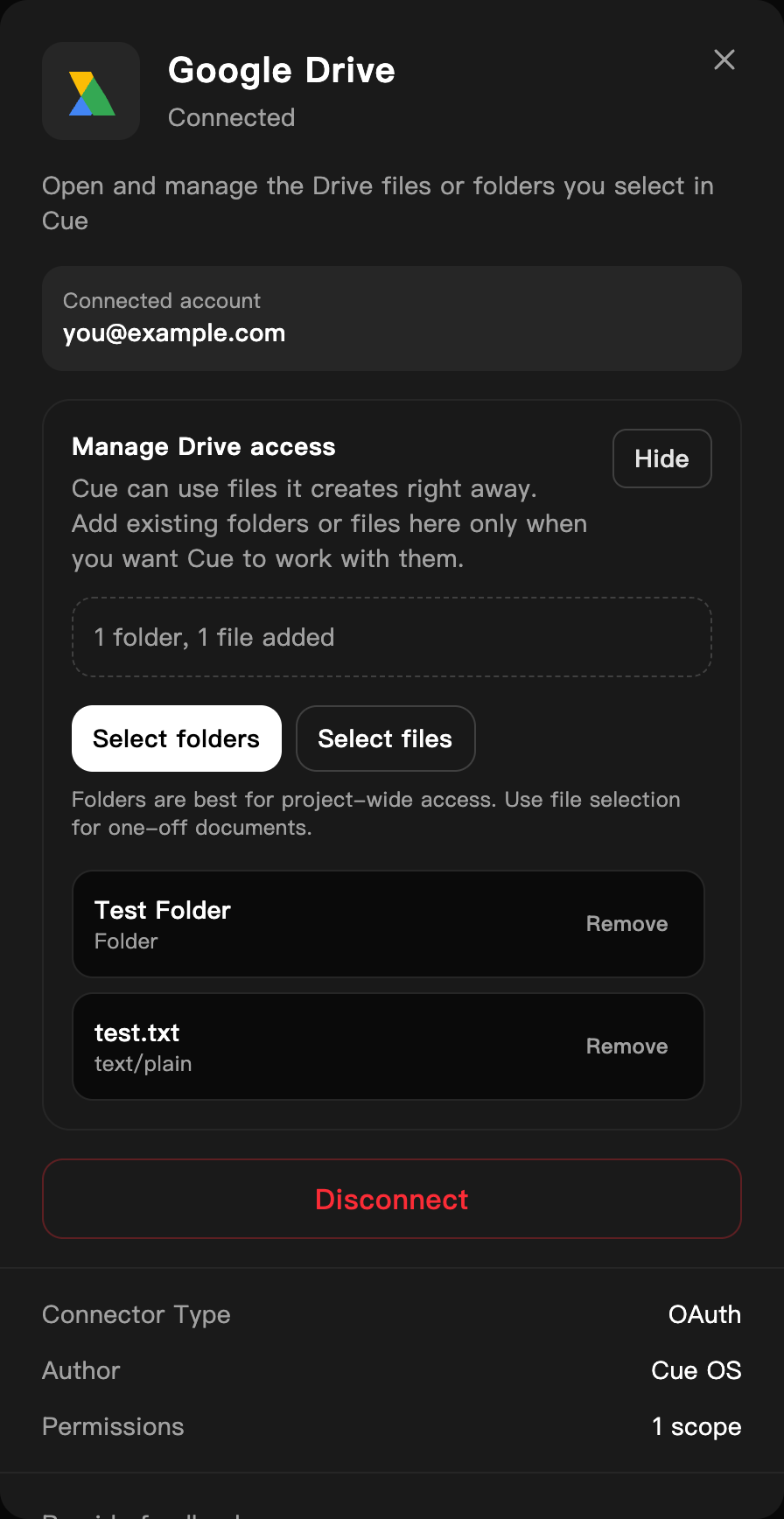
A dedicated QA account with a test folder and a test file selected. The address is replaced with an example.
On iPhone and Android
The iPhone and Android apps are coming; store review is pending. You can use Cue OS in your phone browser now. Open Settings → Connectors and follow the web steps.
With Cue CLI
cue drive is the same command as cue gdrive. The CLI works with the same files the web connection can reach; it cannot add items to the list. Use Select folders or Select files on the web for that.
-
Check the connection with
cue integration list. If Google Drive is missing, runcue integration connect google_drive, open the link it prints, approve, and list again. -
Find and read files:
cue gdrive list --limit 20
cue gdrive search "invoice" --target files --limit 10
cue gdrive read <file-id>
Use
cue gdrive list --parent <folder-id>to look inside a folder, andcue gdrive get <file-id>for details. -
Create and change files and folders:
cue gdrive upload "notes.txt" --content "Meeting notes" cue gdrive update <file-id> --name "notes-final.txt" cue gdrive mkdir "Project Docs" -
cue gdrive delete <file-id>andcue gdrive rmdir <folder-id>delete permanently; they do not move items to Drive's trash. Add--jsonto any command for machine-readable output.
See the command reference for every option.
When Cue asks you first
If one of your agents, acting with its own agent account, tries to upload, change, or delete a Drive file or folder for work that did not come from you, Cue OS puts an approval card in your direct chat with that agent. Nothing changes until you choose Approve. See When Cue asks you first.
Limits today
- Cue can reach only files it created and the items you selected. It cannot browse the rest of your Drive, and broader Drive access is not offered.
- Whether every file inside a selected folder is reachable was not checked for this page. If Cue cannot find a file, select that file directly.
- Connecting, disconnecting, and reconnecting Google Drive were not walked end to end for this page; the steps follow the live screens up to Google's sign-in, plus the product code. The Drive access panel and listing files with an existing connection were checked.
- Agent accounts cannot get a raw Drive token with
cue secret; they usecue gdrive, which runs through Cue OS.
Related
Extensions and integrations · Files · Gmail · Cue CLI command reference