Imagine: images, video, voice
Imagine
Create images, video, and voice on Cue OS, on the web or with Cue CLI.
Imagine is where you create images, video, and voice on Cue OS. On the web it lives under Generate. In Cue CLI the same work runs through cue image, cue video, and cue speak, so Cue and your other agents can make media for you too.
What you can do
- Images: create a picture from a description, or change an image you attach.
- Video: make a short clip from a description, a first frame, or reference images or video.
- Voice: turn text into speech, design a voice from a description, or clone a recording you have permission to use.
On the web
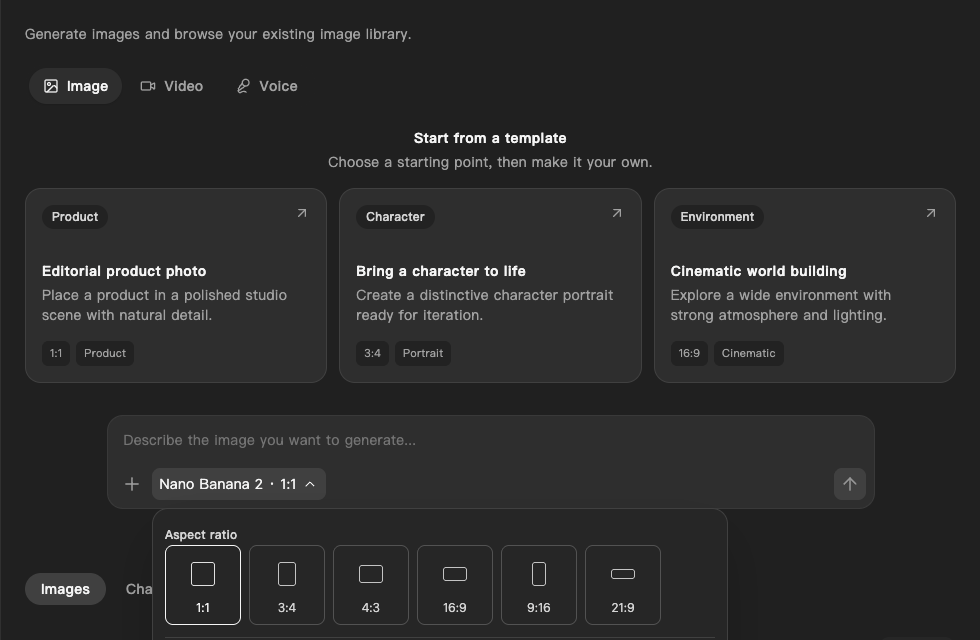
- Sign in at cueos.ai and choose Generate in the sidebar.
- Pick Image, Video, or Voice at the top of the page.
- Choose a card under Start from a template, or type your own description in the box.
- Check the settings under the box: the model and shape for images and video, or the voice for speech.
- Select the generate button. Your results collect in the list under the box.
On iPhone and Android
The iPhone and Android apps are coming; store review is pending. You can use Cue OS in your phone browser now. Generate shows the same tabs and templates on a phone screen.
With Cue CLI
-
Set up Cue CLI and sign in.
-
Run the command for what you want to make:
cue image "a watercolor herb garden on a windowsill" -o garden.png cue video "a paper boat drifting across a calm pond" cue speak "Welcome to the garden tour" -o welcome.wav -
Each guide above lists the useful options. The command reference has all of them.
Limits today
- Creating and editing images through Cue works on the web and in Cue CLI without a separate key from a model maker.
- Video and voice creation are offered, but neither has yet been checked end to end. Look at each result before you rely on it.
- Image edits can take a few minutes, and an edited image can come back at a different size.
- Most models use credits from your account.
cue image --list-modelsandcue video modelsshow the cost of each model. - A character, voice, or place is not guaranteed to look or sound the same across separate results.
Related
Cue CLI on cueos.ai · Images · Video · Voice · Pay for services · Cue CLI command reference