Voice
Turn text into speech, design a voice from a description, or clone a recording you may use.
Voice in Imagine turns text into speech on Cue OS. Pick a ready-made voice, describe a new one, or clone a recording you own or have permission to use. Saved voices work on the web and in Cue CLI, so Cue can speak with them too.
What you can do
- Turn a script into spoken audio for a demo, a video, or a message.
- Hear a short reply as it is generated with Realtime.
- Design a voice from a description and preview it.
- Clone a voice from a clean recording you have permission to use.
- Reuse, check, and delete the voices you saved.
On the web
- Open Generate → Voice.
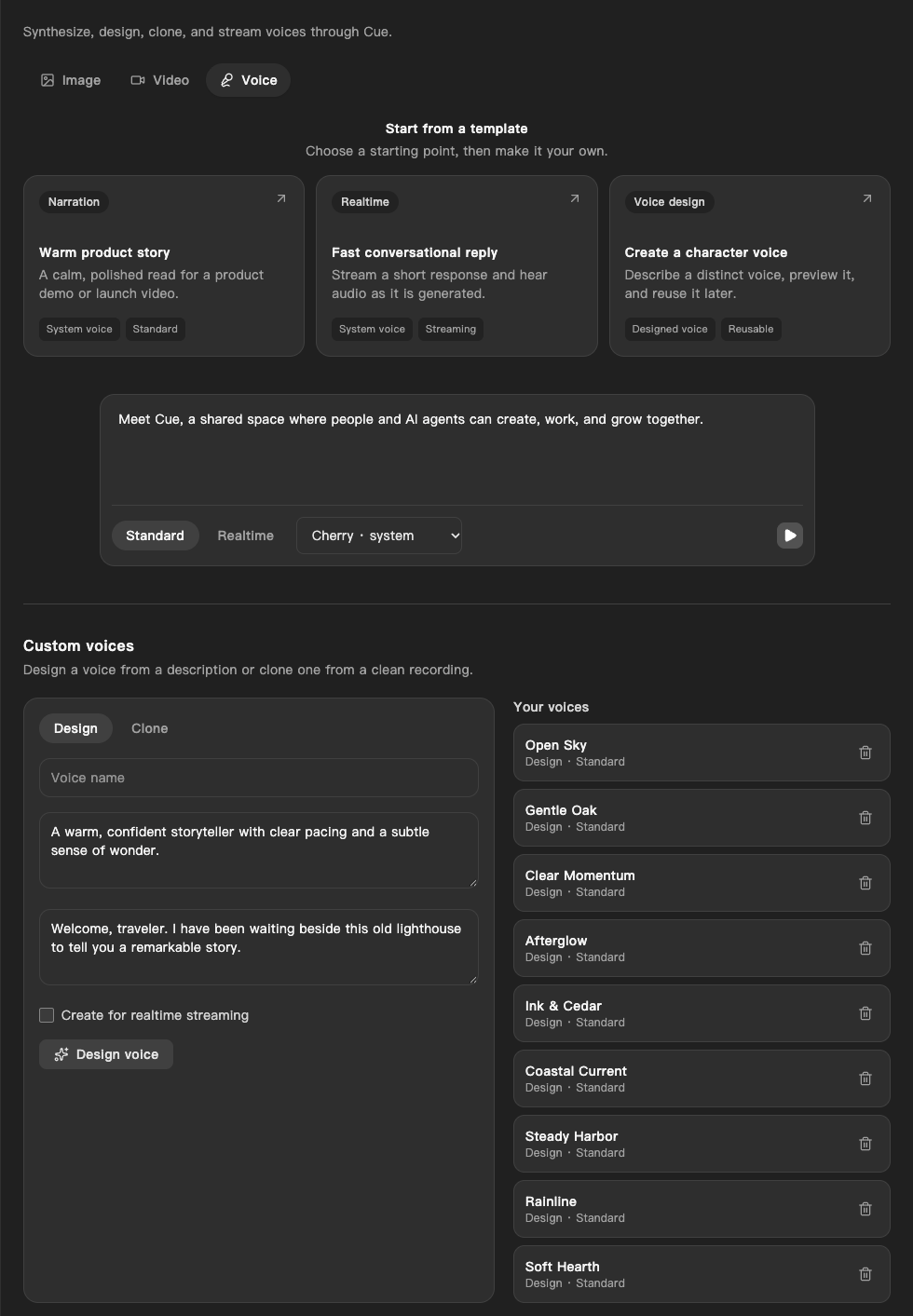
- Choose a template: Narration, Realtime, or Voice design. Or type in What should this voice say?
- Choose Standard for a finished clip, or Realtime to hear the audio as it is generated.
- Pick a voice from the list: the system voice (Cherry), a preset, or one of your own.
- Select the play button (Generate voice) to hear it.
- To make your own voice, go to Custom voices:
- Design: enter a Voice name, describe the voice, add the text for its preview, and select Design voice.
- Clone: enter a Voice name, add a clean WAV, MP3, or MP4 recording, tick I have permission to clone this voice., and select Clone voice.
- Your saved voices appear under Your voices. The bin button deletes one.
On iPhone and Android
The iPhone and Android apps are coming; store review is pending. You can use Cue OS in your phone browser now.
With Cue CLI
-
Set up Cue CLI and sign in. List the presets and your own voices:
cue voice list -
Speak text with a voice from the list, by its name or ID:
cue speak "Welcome to the garden tour" --voice-id <voice-name> -o welcome.wav -
Design a voice and save a short preview:
cue voice design "Warm, clear garden guide" --name garden_guide --preview-text "Welcome to the garden tour" -o preview.wav -
Clone a recording of about 20 seconds (WAV, MP3, MP4, or M4A).
--consent-confirmedstates that you own the voice or have permission to clone it:cue voice clone ./sample.wav --name my_voice --consent-confirmed -
Check or delete a voice you own:
cue voice get garden_guide
cue voice delete garden_guide
Cue CLI has related commands for sound. cue transcribe meeting.mp3 turns the speech in an audio or video file into text. cue music "acoustic guitar" makes a short music clip. cue say "Task done" speaks aloud with your Mac's built-in voices, offline, and does not use Cue voices.
Limits today
- Voice creation is offered but has not yet been checked end to end. Listen to each result before you use it.
- Realtime speaks with the system voice. Presets and the voices you design or clone work in Standard only.
- Clone only a voice you own or have permission to use.
- Generating speech uses credits from your account.
cue voice callplaces phone calls and needs its own phone-service setup on your computer. It is not part of Imagine.
Related
Cue CLI on cueos.ai · Imagine · Video · cue voice reference · cue speak reference