Video
Make a short clip from a description, a first frame, or references, and follow its job.
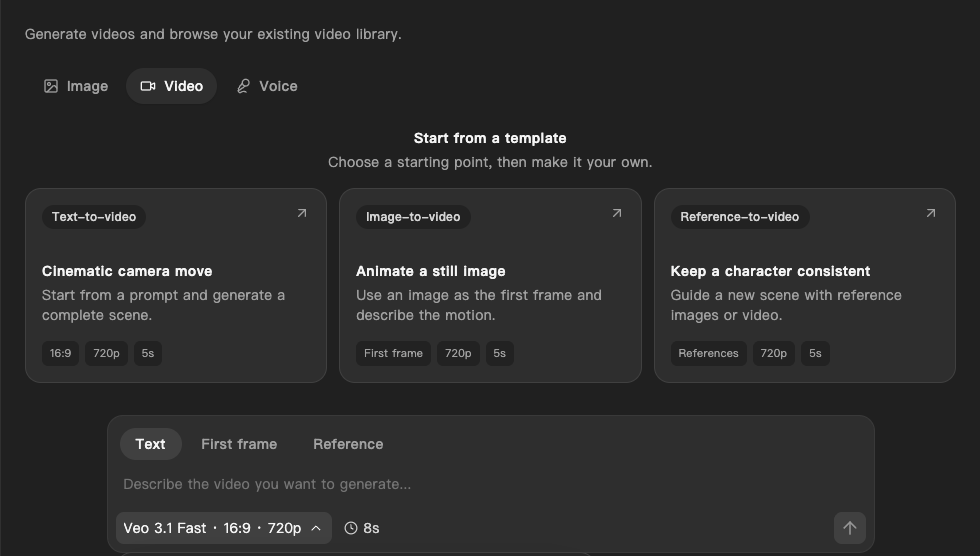
Video in Imagine makes short clips on Cue OS. Describe a scene, start from a still image, or guide it with reference images or video. Each request runs as a job you can check and collect later, on the web or in Cue CLI.
What you can do
- Make a clip from a description of the scene and the camera move.
- Animate a still image by using it as the first frame.
- Guide a new scene with reference images or video.
- Choose the model, shape, resolution, and length the model allows.
On the web
- Open Generate → Video.
- Choose a template, or pick a mode above the box:
- Text: describe the whole scene.
- First frame: select Attach first frame and pick an image, then describe the motion.
- Reference: select Attach references and pick images or a video. The model switches to one that accepts references.
- Type in Describe the video you want to generate…
- Select the settings button under the box. It shows the current model, shape, and resolution, such as 16:9 · 720p. Choose a model (each one lists its resolutions and longest length), an aspect ratio (21:9, 16:9, 4:3, 1:1, 3:4, or 9:16), and 720p or 1080p.
- Select the length button, such as 8s, to change the duration.
- Select the arrow (Generate video). The request appears in the Jobs list under Videos. Select Refresh to check on it.
On iPhone and Android
The iPhone and Android apps are coming; store review is pending. You can use Cue OS in your phone browser now.
With Cue CLI
-
Set up Cue CLI and sign in. See the models on offer and their cost in credits:
cue video models -
Describe a clip, or start from an image:
cue video "a paper boat drifting across a calm pond" cue video "the paper boat slowly turns" --image boat.png -
List your jobs, then check one and save the finished clip:
cue video list
cue video status <job-id> -o boat.mp4
Add --duration <seconds> to ask for a length the model supports. Add --async to submit the job and get your prompt back at once; collect it later with cue video status.
Limits today
- Video creation is offered but has not yet been checked end to end. Check the job status and watch the clip before you use it.
- A clip can take several minutes, and a job can fail.
- Models differ in length, shape, resolution, and whether they accept a first frame or references.
- Cue CLI documents only the length setting. Choose shape and resolution on the web.
- A reference helps but does not guarantee the same character across clips.
- Video uses credits from your account and costs more than an image.
Related
Cue CLI on cueos.ai · Imagine · Images · Voice · cue video reference